
WordPress Speed Optimization: Proven Fixes for 80+ CWV
WordPress speed optimization is the fastest way to stop losing visitors to slow load times and start improving your rankings, leads, and sales with real, measurable performance fixes.
If your WordPress site feels slow, it’s not just annoying. It costs you rankings, leads, and sales. People bounce fast. Google notices. And once your site gets heavy, it usually keeps getting worse unless someone cleans it up properly.
I offer WordPress speed optimization that’s practical and measurable. No vague “we’ll speed it up” promises. I’ll audit what’s actually slowing your site down, fix it step by step, and leave you with settings you can keep long-term.
Ready to Speed Up Your WordPress Site Without Breaking Anything?
If your site feels slow, your visitors feel it too. Let me run a focused speed audit, fix the real bottlenecks, and improve Core Web Vitals the right way—so you can stop losing rankings, leads, and sales.
What WordPress speed optimization actually means
WordPress speed optimization is the process of reducing how long your pages take to load and respond, without breaking design or functionality.
That includes improving things like:
- Largest Contentful Paint (LCP): how fast your main content appears
- Interaction to Next Paint (INP): how responsive your site feels when users click
- Cumulative Layout Shift (CLS): how stable the layout is (no jumpy elements)
- TTFB (Time to First Byte): how fast your server delivers the first response
These are part of Core Web Vitals, and they matter because they reflect real user experience.

Why site speed matters (beyond “it feels faster”)
Here’s what speed improves when it’s done right:
- Better SEO (especially when competitors are similar)
- Higher conversion rates (forms, checkouts, calls, bookings)
- Lower bounce rate (people don’t wait)
- More pages viewed per session
- Less strain on hosting (fewer CPU spikes and crashes)
However, speed work also has tradeoffs if it’s done carelessly.

Common drawbacks (and how I avoid them)
- Over-optimization can break layouts: I test changes in stages and use safe settings first.
- Caching can conflict with dynamic features (cart, membership, LMS): I apply smart exclusions so user-specific pages still work correctly.
- Aggressive minification can break scripts: I only minify what’s safe and verify on mobile, not just desktop.
Who this service is for
This is a good fit if you have:
- A business site that loads slowly on mobile
- A WooCommerce store with a heavy theme or lots of plugins
- Low Core Web Vitals scores (LCP/INP/CLS issues)
- A site that used to be fast but got slow over time
- A site that scores “fine” in tools but still feels laggy to real users
What I Optimize (the parts that actually move the needle)
I don’t just install a plugin and call it speed work. I look at the whole stack.
1) Hosting + server setup (the foundation)
- TTFB fixes (server response time)
- PHP version and OPcache checks
- HTTP/2 or HTTP/3 where supported
- Database performance basics
- CDN setup if it makes sense for your audience
2) Caching (done the right way)
- Page caching configuration
- Browser caching + headers
- Object cache evaluation (especially for WooCommerce)
- Cache exclusions for login/cart/checkout/dynamic areas
3) Images and media (usually the #1 issue)
- Resize oversized images (not just “compress”)
- Modern formats (WebP/AVIF where appropriate)
- Lazy loading improvements
- Fix slider/video embeds that delay LCP
4) CSS/JS and third-party scripts
- Remove unused CSS where possible
- Delay non-critical JavaScript
- Fix render-blocking assets
- Reduce the impact of chat widgets, trackers, and heavy tag setups
5) Theme + plugin performance cleanup
- Identify heavy plugins and duplicated features
- Replace slow features with lighter options (only if needed)
- Reduce admin bloat where it affects front-end performance
6) Core Web Vitals tuning
- LCP element optimization (hero image, headings, above-the-fold sections)
- INP improvements (script timing, event delays, plugin conflicts)
- CLS fixes (font loading, image dimensions, ads, banners)
Want a faster WordPress site that stays fast?
If you’re tired of guessing and plugin-hopping, this service is for you. I’ll identify what’s slowing your site down, fix it without breaking things, and focus on improvements that help users and search engines.
My speed Optimization Process
I follow a clear workflow so nothing gets missed.
Step 1: Speed audit (real causes, not guesses)
I check:
- PageSpeed Insights + Lighthouse
- Waterfall (what loads first, what blocks, what’s slow)
- Real-world signals (field data if available)
- Mobile performance (because that’s where most sites fail)
You get: a short list of the top problems in plain language.
Step 2: Quick wins first
Next, I handle changes that usually deliver instant gains:
- Cache configuration
- Image fixes on top traffic pages
- Basic script delays
- Font loading cleanup
Step 3: Deep optimization
Then I address the bigger bottlenecks:
- Theme and plugin load issues
- Database-related slowdowns
- Render-blocking resources
- Third-party script control
Step 4: Core Web Vitals improvements
After that, I target the metrics that matter:
- LCP, INP, CLS improvements with safe testing
- Mobile-first tuning
- Fix layout shifts and late-loading elements
Step 5: Final testing and handoff
I test:
- Mobile + desktop
- Logged-in vs logged-out behavior
- Key pages (home, services, blog, checkout if relevant)
- Visual and functional issues after changes
You get: before/after proof, plus a short “what changed” summary.
A quick self-check: what’s slowing most WordPress sites?
Here’s a simple table I use when diagnosing sites quickly:
| What you’re seeing | Most likely cause | What I usually do |
|---|---|---|
| Slow first load, even on a small page | High TTFB / server delay | Hosting/server tuning, caching, PHP/OPcache checks |
| Page “loads” but still feels laggy | Heavy JS + third-party scripts | Delay scripts, reduce tag load, fix main-thread work |
| Big jumpy layout shifts | Missing dimensions, late fonts, banners | Set dimensions, stabilize layout, improve font loading |
| PageSpeed score is okay but users complain | Field data issues, mobile CPU limits | Mobile-first cleanup and INP/LCP tuning |
| WooCommerce pages are slow | Dynamic pages + plugin overhead | Smart caching exclusions + database/object cache review |
What you’ll get (deliverables)
I keep deliverables practical, not fluffy.
- Speed audit summary (what was slow and why)
- Optimized caching configuration
- Image and media performance improvements
- Script and asset optimization (safe settings)
- Core Web Vitals fixes where applicable
- Before/after performance comparison (screenshots + key metrics)
- A short maintenance checklist so the site stays fast

Completed Project Examples
1) Details of the Project:
Site type: Outdoor Sports Niche Blog
Main problem: Slow LCP, too many plugins, oversized images
What I fixed: Caching, image resize, delay JS, font loading
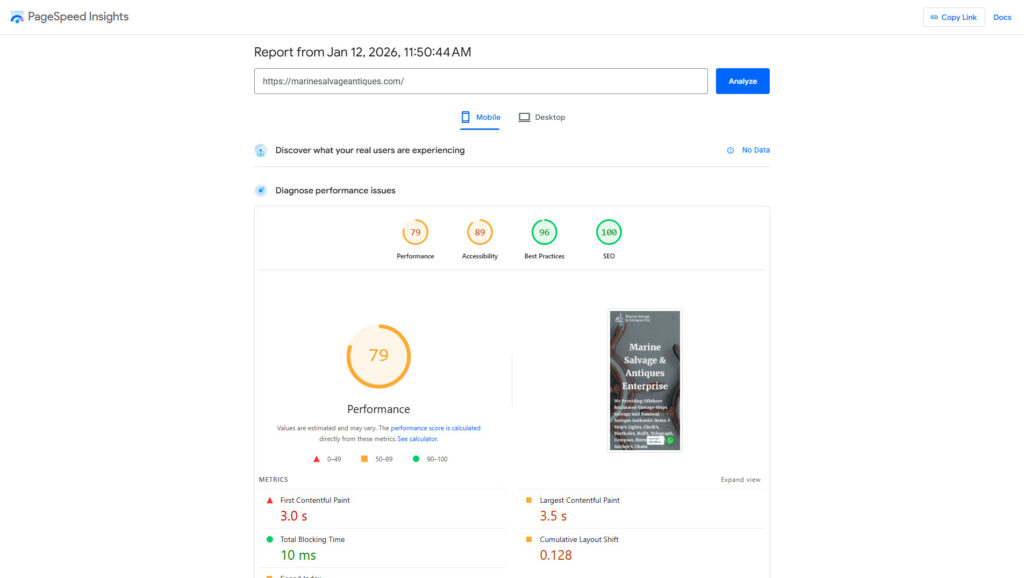
After Page Speed Optimization

2) Details of the Project:
Site type: eCommerce (Ship items supplier)
Main problem: Heavy theme, plugin conflicts, and oversized images.
What I fixed: Exclusions, object cache review, script cleanup
After Page Speed Optimization
Frequently Asked Questions

Will this improve my Core Web Vitals scores?
Yes, that’s part of the goal. I focus on real fixes for LCP, INP, and CLS, not just cosmetic PageSpeed tweaks. However, results depend on hosting, theme quality, plugins, and third-party scripts that may be required for your business.
Do you optimize WooCommerce sites without breaking the cart or checkout?
Yes. WooCommerce needs careful caching rules and script handling. I apply exclusions for dynamic pages and test the full purchase flow. That way, your site can be faster while cart, checkout, coupons, and payment steps still work properly.
Which speed plugin do you use?
It depends on your setup. I choose tools based on your hosting, theme, and site type rather than forcing one plugin on every project. The main point is correct configuration, because even the best plugin performs poorly when it’s misconfigured.
Can you guarantee a specific PageSpeed score?
No, and nobody should. Scores vary by device, location, and what your pages include. What I can do is improve the real bottlenecks and show measurable before/after gains in load time and Core Web Vitals signals, based on your site.
Will speed optimization affect my design or functionality?
It shouldn’t. I apply changes in controlled steps and test key pages after each major adjustment. However, if a theme or plugin is built in a way that blocks optimization, I’ll explain the limitation and recommend the safest workaround.